Building Enterprise Content Pipelines with Agility Writer's REST API
A technical guide to integrating Agility Writer's REST API into enterprise content workflows, covering authentication, endpoints, error handling, and production pipeline architecture.
Adam Yong
Founder & CEO
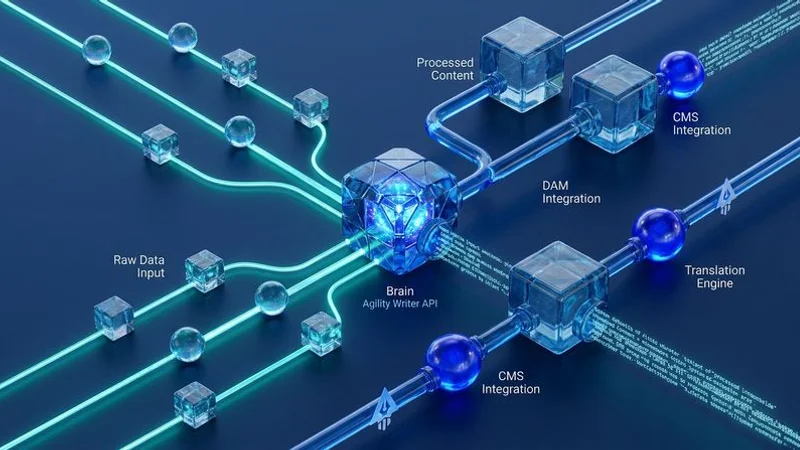
We know that no-code integrations like Zapier and WordPress work well for standard workflows. But enterprise content operations often require deeper integration: custom logic, conditional branching, volume management, and tight coordination with proprietary systems. Our team frequently sees this breaking point when scaling content in fast-growing markets like Malaysia, where digital ad spend is expected to cross USD 2 billion in 2026.
That is where Agility Writer’s REST API becomes essential.
We learned early on from Agility Writer’s founder, Adam Yong, a seasoned SEO professional with nearly two decades of experience, that true scale with an AI SEO writing platform requires bypassing the manual interface.
“The API gives engineering teams direct programmatic access to content generation, retrieval, and management capabilities.”
Our guide on Building Enterprise Content Pipelines with Agility Writer covers everything you need to build a production-grade system using the API. Let’s look at the data, what it actually means for your operations, and explore practical ways to build this out.
API Fundamentals
Authentication
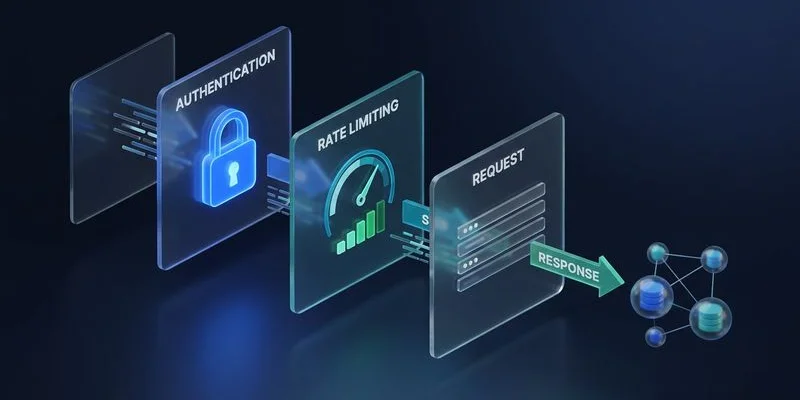
We secure all API requests using a standard API key placed in the request header. This requirement kicks in heavily on the Pro plan, which currently costs about $88 per month and unlocks full programmatic access. Our preferred method is generating separate keys for each service or team accessing the API. This specific scoping makes it straightforward to audit usage and revoke access for an integration without disrupting others.
Authorization: Bearer YOUR_API_KEY
We generate these API keys directly in the Agility Writer dashboard under Settings > API Access. Each key accepts specific permission scopes:
- Read: Retrieve articles, check generation status, access account information
- Write: Start content generation, update article parameters, manage queue
- Admin: Manage API keys, view usage metrics, configure webhooks
Base URL and Versioning
We point all our API requests to the standard base URL provided by the platform. The API routes all endpoints securely through this primary address:
https://api.agilitywriter.com/v1/
Our developers appreciate that existing versions remain supported for a minimum of twelve months after a new release. This grace period gives teams ample time to migrate without causing service disruptions. We always pin our API version in the request headers to prevent unexpected changes to the payload structure.
Rate Limits
We monitor rate limits closely because they scale based on your subscription tier. The system issues rate limits to maintain stability across the entire platform. Our infrastructure relies on reading the limit headers included in every single API response.
| Plan Level | Requests Per Minute | Requests Per Hour |
|---|---|---|
| Standard | 60 | 1,000 |
| Professional | 120 | 5,000 |
| Enterprise | Custom limits | Custom limits |
These exact headers appear in every server response:
X-RateLimit-Limit: 120
X-RateLimit-Remaining: 115
X-RateLimit-Reset: 1706817600
We build our clients to respect these constraints to prevent dropped connections. Using programming libraries like Python’s Tenacity handles exponential backoff automatically when limits are approached. Our backend code depends on this logic during high-volume pushes. This simple addition prevents failed requests entirely.
Core Endpoints
Content Generation
We start the article creation process by sending a POST request to /v1/articles/generate. The payload requires specific parameters to define your content structure and format. Our team often specifies advanced AI models like Gemini Flash 2.0 or GPT-4 within the request to ensure high-quality output.
{
  "keyword": "best project management software for remote teams",
  "content_type": "article",
  "word_count_target": 2500,
  "tone": "professional",
  "language": "en",
  "outline_mode": "auto",
  "include_faq": true,
  "include_key_takeaways": true,
  "callback_url": "https://your-domain.com/webhooks/article-complete"
}
The response immediately returns a unique generation ID. We use this specific ID to track progress across our entire application and database.
Status Checking
We limit manual status checking strictly to fallback scenarios when webhooks fail. Polling this endpoint continuously wastes your API rate limits very quickly. Our engineers recommend sending a GET request to /v1/articles/{generation_id}/status only when an automated process stalls.
{
  "generation_id": "gen_abc123",
  "status": "completed",
  "progress_percent": 100,
  "estimated_completion": null,
  "created_at": "2026-01-20T10:30:00Z",
  "completed_at": "2026-01-20T10:34:22Z"
}
The system returns possible statuses like queued, generating, completed, or failed.
Article Retrieval
We retrieve the completed article using the GET /v1/articles/{generation_id} endpoint. The response delivers the full content in both HTML and Markdown formats. Our WordPress sites ingest the raw HTML directly, while our headless CMS deployments prefer the clean Markdown.
The payload also includes SEO metadata, generated image references, and the final word count. We always verify this word count immediately, as Agility Writer easily handles long-form pieces up to 7,000 words.
Webhooks
We configure webhooks to receive instant notifications the moment an article finishes generating. This push-based system removes the need to constantly poll the API. Our setup targets the /v1/webhooks endpoint with a simple configuration payload:
{
  "url": "https://your-domain.com/webhooks/agility-writer",
  "events": ["article.completed", "article.failed", "batch.completed"],
  "secret": "your_webhook_signing_secret"
}
The platform signs all webhook payloads with your secret using the HMAC-SHA256 algorithm. We mandate verifying this exact signature before processing any data in production. A smart developer practice is to return a 200 OK HTTP status within five seconds to prevent the system from retrying the delivery.
Building Enterprise Content Pipelines with Agility Writer: Architecture
The Queue-Based Pattern
We process thousands of articles by placing a durable message queue between our CMS and the API. A direct, synchronous connection often fails during traffic spikes or when API limits pause the process. Our preferred setup uses Amazon SQS hosted in the ap-southeast-1 region, which provides ultra-low latency for our Malaysian servers.
This architecture decouples request submission from the actual API interaction. We break this system down into five essential components:
- Content Request Service: Accepts content requests from editorial tools, validates the parameters, and places them into the queue.
- Message Queue: Buffers the generation requests securely using platforms like RabbitMQ or Amazon SQS.
- API Worker: Consumes messages from the queue, submits them to the API, and manages the lifecycle while respecting rate limits.
- Webhook Receiver: Captures completion notifications, retrieves the article, and triggers post-processing.
- Content Delivery Service: Routes the finalized content to your publishing pipeline or CMS.

Error Handling and Resilience
We build production pipelines expecting temporary failures at every single stage. The API returns specific HTTP error codes that dictate how the background worker should respond. Our conditional retry logic handles these distinct scenarios automatically:
429 Too Many Requests: Back off and retry after the indicated wait period.500 Internal Server Error: Retry up to three times with exponential backoff.400 Bad Request: Do not retry, flag the content request for manual review, and log the error.422 Unprocessable Entity: Route to manual correction because the request parameters are invalid.
Handling duplicate webhook deliveries gracefully is just as critical. We use the generation ID as an idempotency key in our database architecture. This simple check prevents the system from publishing the identical article twice if a webhook fires multiple times.
Batch Processing
We utilise the batch endpoint to submit multiple generation requests simultaneously during large content sprints. This method handles up to 200 articles in a single call, which drastically reduces API overhead. Our workflow passes an array of article objects to the /v1/articles/batch endpoint:
{
  "articles": [
    {
      "keyword": "remote team communication tools",
      "content_type": "article",
      "word_count_target": 2000
    },
    {
      "keyword": "async communication best practices",
      "content_type": "article",
      "word_count_target": 1800
    }
  ],
  "callback_url": "https://your-domain.com/webhooks/batch-complete",
  "priority": "standard"
}
The system processes these batch requests as a single unit. We receive one webhook notification when all articles in the batch finish generating, simplifying tracking for large content runs.
Post-Processing Pipeline
Content Enrichment
We rarely publish raw generated text without passing it through an automated enrichment layer. Automated transformations elevate the content quality and structure before it ever reaches the CMS. Our scripts often pass the draft to optimisation APIs like NeuronWriter to push SEO scores above 80 before publishing.
- Internal link injection: Scans generated content to insert links to existing pages using a mapped lookup table, following a proven silo linking strategy.
- Schema markup: Adds appropriate structured data formats like Article, FAQ, or HowTo schema.
- Media enhancement: Replaces placeholder references with approved images from an internal asset library.
Quality Validation
We save significant business resources by automating the quality assurance process. The average salary for a content writer in Malaysia sits around RM 62,605 per year, making manual review of thousands of articles financially impractical. Our validation scripts run several pass/fail tests before flagging any content for human review:
- Word count verification: Confirms the article meets the minimum length requirements.
- Heading structure validation: Ensures proper H2 and H3 hierarchy without skipped levels.
- Link validation: Verifies all internal and external links resolve correctly.
- Brand voice consistency: Applies automated checks for terminology and style guide compliance.
Format Conversion
We finalize the pipeline by converting the validated text into our specific CMS format. Raw HTML often requires translation into native components like WordPress Gutenberg blocks.
Our delivery service maps the SEO metadata directly into plugins like Yoast or Rank Math automatically. Assigning categories and taxonomies happens simultaneously based on the article’s target keywords.
Monitoring and Observability
Metrics to Track
We require comprehensive monitoring to keep an enterprise content pipeline running smoothly. Blindly sending API requests without tracking success rates will inevitably cause silent failures. Our dashboards display several key performance indicators to keep the team informed:
- Generation success rate: Percentage of requests that complete successfully versus those that fail.
- Average generation time: How long articles take from request to completion.
- API latency: Response times for each endpoint to detect degradation.
- Queue depth: The number of pending requests in the message queue.
- Content throughput: Articles generated per hour, day, and week.
Alerting
We configure strict alert thresholds that trigger notifications in our Slack channels. Automated systems only work when human operators know exactly when to intervene. Our critical alerts include rules for API timeouts and queue backlogs:
- Generation failure rate exceeds five percent over a one-hour window.
- API response times exceed two times the normal baseline.
- Queue depth exceeds the threshold indicating processing is falling behind.
- Webhook delivery failures exceed three consecutive retries.
Logging
We log every single API interaction with detailed payloads to speed up debugging. Stripping sensitive data like API keys before writing to the log file is mandatory for security compliance. Our preferred setup captures these specific events directly into tools like Datadog:
- Request parameters, excluding sensitive data.
- Response status codes and timing metrics.
- Error details and individual retry attempts.
- Webhook receipt and processing outcomes.
Security Considerations
API Key Management
We store all API credentials securely in dedicated secrets management systems like AWS Secrets Manager or HashiCorp Vault. Hardcoding keys into application logic introduces massive vulnerabilities into your pipeline. Our security protocol requires three standard practices:
- Rotating keys quarterly to prevent stale access.
- Scoping keys to the absolute minimum permissions necessary.
- Storing credentials in secure vaults rather than configuration files.
Data in Transit and Webhooks
We enforce standard HTTPS for all API communication, even in local development environments. Disabling certificate verification exposes your system to middleman attacks. Our webhook receivers verify every single HMAC-SHA256 signature and immediately drop any mismatched payloads. Logging these rejected requests allows the team to conduct regular security reviews.
Conclusion: Scaling Your Pipeline
We always recommend starting with a simple script that generates a single article before building the full architecture. Once basic authentication and generation work reliably, you can incrementally introduce the message queue and webhook receiver. Our experience shows that matching your infrastructure to your actual volume prevents over-engineering. A small agency producing ten posts a week requires a different setup than an operation generating hundreds per day.
We view the API as the core foundation for growth. The pipeline architecture determines whether your content operations scale smoothly or hit friction at every inflection point. Our final piece of advice is that Building Enterprise Content Pipelines with Agility Writer gives you the exact tools needed to automate at scale. Schedule a technical review with your engineering team this week to map out your initial integration steps.
Ready to Create Content That Ranks?
Start generating SEO-optimized articles with Agility Writer.
Try Us at $1